Four core business requirements
- Remote access to company computers or systems
- Security for remote work
- Team communication and video meetings
- Using company telephony to contact customers
Configuration and service scope
- Plan remote desktop and system access around existing IT resources
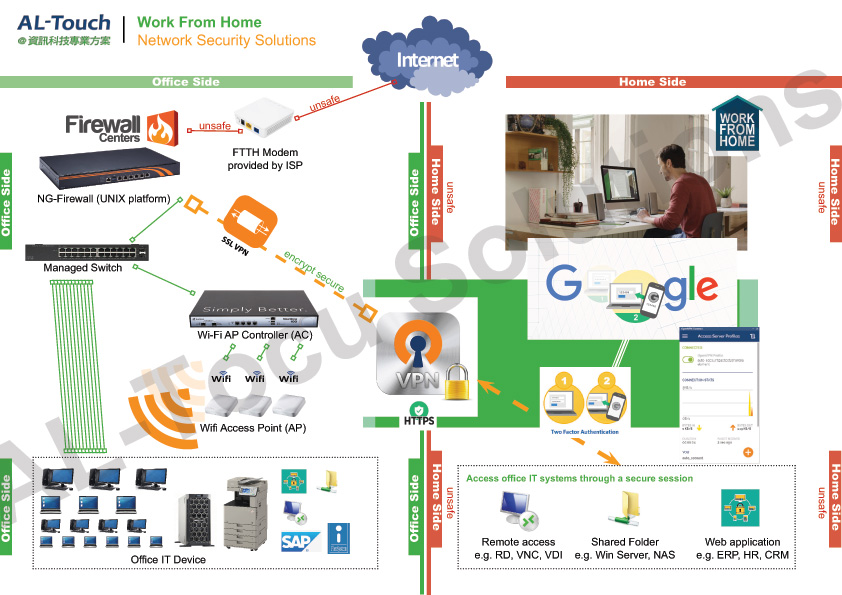
- Encrypted VPN connections and multi-factor authentication according to the solution
- Public-cloud meeting platforms
- IP phone and mobile-device connectivity
- Laptop rental and delivery subject to availability
Managing remote-access tools
ToDesk Enterprise is an option for remote support, managed alongside VPNs, permissions, activity records and access revocation when staff leave.
Plan secure remote work around existing resources
Remote work needs to cover company computers and systems, collaboration, meetings and telephone contact. Review staff devices, accounts and use cases before choosing VPNs, remote desktop or controlled remote tools, with authentication, authorisation and access records. ToDesk Enterprise can be an additional option; confirm connection, file and clipboard controls against licensing and security policies.
Information and references
When is this service suitable?
Common needs
- Colleagues need business applications or files at home.
- Telephone and meeting tools do not work well together for remote staff.
- You want clear management of remote tools, devices and accounts.
Which service do I need?
- ToDesk Enterprise
Confirm remote-support licensing for business usage.
- Work-from-home solutions
Discuss remote work, communications and tool configuration.
- Business computer maintenance
Connect remote support with everyday IT management.
Prepare for an enquiry
- Approximate support staff, user and device counts.
- Main office, branch or overseas usage scenarios.
- Existing remote tools and the operations to manage.
For an initial enquiry, describe the issue and equipment only. Do not submit passwords or verification codes. The team will arrange a secure channel for sensitive documents and incident records.
Enquire about work-from-home solutionsCybersecurity and AI useExplore security planning, responsibilities and acceptance considerations
Cybersecurity · Safe AI use
Remote work and business support: security planning priorities
「Work-from-home and remote working solutions」 includes the following security priorities; measures, tests and deliverables are specified in the proposal.
- Support authorisationConfirm supported devices, users and administrators, then discuss connection approvals, access windows and termination.
- Operations and dataCheck permissions, file transfers and logs for the tool and plan, keeping personal accounts and shared passwords out of business maintenance.
- Maintenance and incidentsClarify updates, unusual-connection alerts and incident contacts, including access termination and record preservation.
AI considerationsFor AI or scripted remote work, restrict accessible devices and tools. Confirm approval procedures for installation, permission changes and sensitive-data transfer.
Planning and acceptance recordsRemote account and device inventory, permissions and log settings, deactivation and incident procedures.
You may also want to know
Must we replace all company equipment for a few remote workers?
List the systems, devices, meeting and telephone functions staff need, then compare remote desktop, VPN and support tools. Connectivity and everyday workflow tests help determine what equipment can be retained.
Do VPN, remote desktop and ToDesk serve identical purposes?
Their connection methods and controls differ. Assess system access, remote support and management needs while retaining the existing VPN solution as an option.