Hong Kong businesses · Backup, recovery and data security

Veeam products and capabilities

Explore protection for on-premises systems, cloud, SaaS, Kubernetes, data and AI, translating backup and recovery into operational arrangements.

Manufacturer information reviewed: 2026-10-13

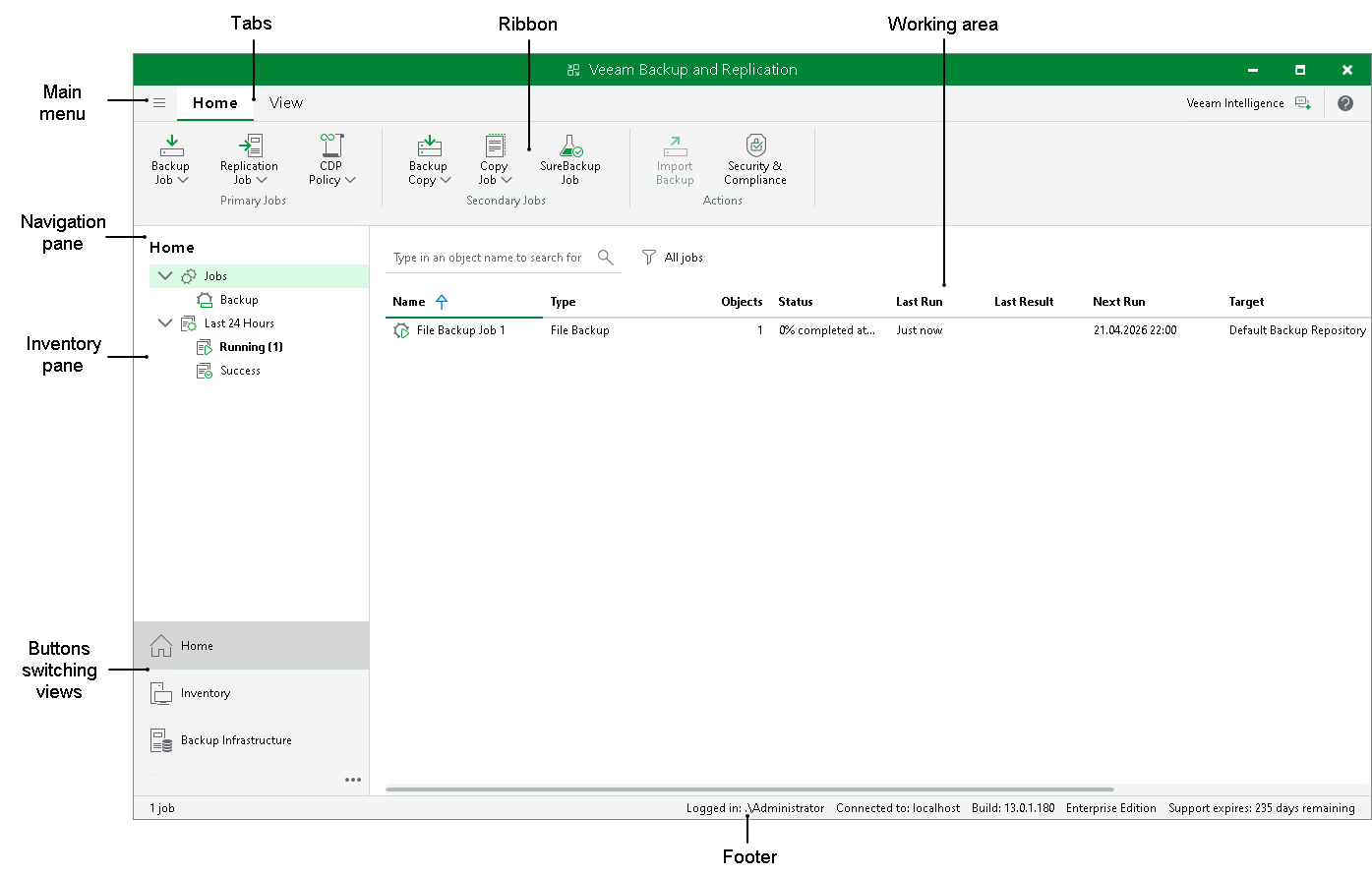
Official Veeam Backup & Replication console with workspace explanations
Vendor Backup & Replication console example. Interface and features depend on version and licence.Vendor image source

Connect backup, monitoring and recovery

  1. Important data
  2. Backup copies
  3. Recovery verification
Conceptual backup and recovery workflow

VEEAM DATA PLATFORM

Three editions for different management needs.

From backup and recovery to monitoring, analytics and orchestration, confirm the components you need.

Foundation

Backup and recovery

  • Veeam Backup & Replication

Core platform protection and recovery. Check compatible workloads and features by version.

Advanced

Monitoring, analytics and threat insights

  • Veeam Backup & Replication
  • Veeam ONE

Adds observability and analytics to core protection.

Premium

Recovery orchestration, testing and documentation

  • Veeam Backup & Replication
  • Veeam ONE
  • Veeam Recovery Orchestrator

Adds disaster recovery orchestration. Vault and Cyber Secure are optional additions.

Vault and Cyber Secure are optional additions.Official edition comparison

PRODUCTS & CAPABILITIES

Choose protection around your data and systems.

Compare self-managed software, cloud services and integration tools, including features and management requirements.

Showing 43 products / platform components

Self-managed platform

Veeam Data Platform

Integrates backup, recovery, monitoring and disaster recovery for organisations that need control of backup architecture, storage location and daily operations.

  • Combine on-premises and cloud backups
  • Protect restore points with immutable copies
  • Add monitoring and recovery orchestration by edition

Suitable scenariosEnterprise backup platform for hybrid infrastructure

  • Virtual machines
  • Physical servers
  • AWS・Azure・Google Cloud
Key capabilities and scope
  • Data protection across on-premises and cloud environments
  • Immutable backups and access controls
  • Threat detection and clean restore-point checks
  • Monitoring, analytics and recovery orchestration by edition

Platforms / workloadsVirtual machines · Physical servers · AWS・Azure・Google Cloud · NAS and object storage · Identity and enterprise applications

Foundation, Advanced and Premium include different components. Check subscriptions for cloud services and other standalone products separately.

Enquire about product solutions

Core platform component

Veeam Backup & Replication

Coordinate backup, replication and recovery for servers, virtual machines and data according to downtime risks and recovery objectives.

  • Image, file and application recovery
  • Verify backup and recovery usability
  • Immutable storage and separated permissions

Suitable scenariosCentral server and VM management

  • VMware vSphere
  • Microsoft Hyper-V
  • Nutanix AHV
Key capabilities and scope
  • Image-level backup and granular recovery
  • Instant Recovery and cross-platform recovery
  • Backup health checks and recovery verification
  • Immutable storage, RBAC and four-eyes approval
  • Cloud and off-site backup copies

Platforms / workloadsVMware vSphere · Microsoft Hyper-V · Nutanix AHV · Windows・Linux · Public cloud · NAS

Support for Instant Recovery, CDP, application-aware processing and cross-platform recovery depends on the source platform, deployment and version. Test actual recovery times.

Enquire about product solutions

Platform monitoring component

Veeam ONE

Give IT teams visibility of backup health, capacity, risk alerts and protection coverage.

  • View backup alerts centrally
  • Forecast capacity and resource usage
  • Retain protection and management reports

Suitable scenariosBackup teams needing ongoing monitoring

  • Veeam backup infrastructure
  • Protected workloads
  • VMware・Hyper-V
Key capabilities and scope
  • Real-time monitoring, alerts and dashboards
  • Capacity planning and resource analytics
  • Backup and management reports
  • Intelligent diagnostics and troubleshooting
  • Enhanced RBAC, SSO and MFA in 13.1

Platforms / workloadsVeeam backup infrastructure · Protected workloads · VMware・Hyper-V · Microsoft 365 backup

Data Platform Advanced and Premium include Veeam ONE. Standalone and service-provider licensing have separate arrangements. Confirm AI features and monitoring for newer platforms against compatible versions.

Enquire about product solutions

Recovery orchestration component

Veeam Recovery Orchestrator

Turn disaster recovery procedures into executable, testable and documented recovery plans.

  • Orchestrate application recovery steps
  • Schedule checks and isolated tests
  • Generate test and recovery records

Suitable scenariosOrganisations rehearsing disaster recovery

  • VMware vSphere
  • Microsoft Hyper-V
  • Microsoft Azure
Key capabilities and scope
  • Recovery plans and workflow orchestration
  • Scheduled readiness checks and isolated testing
  • Review achievement of RPO and RTO objectives
  • Automatically updated testing and execution reports

Platforms / workloadsVMware vSphere · Microsoft Hyper-V · Microsoft Azure · Protected virtual and physical workloads

The orchestration component of Data Platform Premium builds on Backup & Replication and ONE. Support varies by target environment; validate recovery times in the actual environment.

Enquire about product solutions

Software appliance deployment

Veeam Software Appliance

Deploy Veeam as a pre-hardened Linux software appliance to reduce manual backup-server installation and maintenance.

  • Pre-hardened Linux appliance
  • Deploy as an ISO or virtual appliance
  • Coordinate system and backup software updates

Suitable scenariosSoftware deployment option for backup servers

  • On-premises backup servers
  • Branch locations
  • Supported virtual, physical and cloud infrastructure
Key capabilities and scope
  • Veeam-managed JeOS
  • ISO or virtual appliance deployment
  • OS and backup software update management
  • Web UI, RBAC and SAML SSO
  • Backup-server high availability, depending on version

Platforms / workloadsOn-premises backup servers · Branch locations · Supported virtual, physical and cloud infrastructure

This is a software deployment option, not a specific hardware brand. Check hardware, workload and version compatibility. Features are not identical to those of a Windows backup server.

Enquire about product solutions

Platform infrastructure component

Veeam Infrastructure Appliance

Configure backup proxies or immutable repositories using a pre-hardened Linux infrastructure appliance.

  • Deploy backup proxies or repositories
  • Configure infrastructure with hardened Linux
  • Manage connectivity and updates by version

Suitable scenariosSupporting backup infrastructure component

  • Backup Proxy
  • Hardened Repository
  • Application Backup Repository
Key capabilities and scope
  • JeOS ISO deployment
  • Role-based infrastructure configuration
  • Hardened repositories and certificate pairing
  • FC, iSCSI and other storage connectivity in 13.1

Platforms / workloadsBackup Proxy · Hardened Repository · Application Backup Repository

Its role differs from the Software Appliance backup server. Disks, networking, storage and versions must meet official requirements. Configure immutable retention correctly.

Enquire about product solutions

Licensing package for smaller businesses

Veeam Data Platform Essentials

Bring backup, recovery, monitoring and reporting together for common IT protection needs in smaller organisations.

  • SME backup licensing bundle
  • Combine protection, monitoring and reports
  • Expand licences in packs as needed

Suitable scenariosSmaller businesses: confirm eligibility and limits first

  • SME virtual machines
  • Physical computers and servers
  • Cloud workloads
Key capabilities and scope
  • Foundation protection with ONE
  • Virtual, physical and cloud backup
  • Recovery and off-site copies
  • Daily monitoring and reporting

Platforms / workloadsSME virtual machines · Physical computers and servers · Cloud workloads · NAS

For businesses with fewer than 250 employees and 50 workloads. Licences are sold in packs of five, up to 50 workloads. Premium orchestration and Vault are separate options; confirm eligibility before purchase.

Enquire about product solutions

Platform workload component

Veeam virtualisation protection and plug-ins

Protect existing or new virtualisation platforms and plan recovery options for future migrations.

  • Protect multiple virtualisation platforms
  • Manage backup and recovery centrally
  • Plan migration against compatibility matrices

Suitable scenariosPlatform workload integration component

  • VMware・Hyper-V
  • Nutanix AHV
  • Proxmox VE
Key capabilities and scope
  • Native platform integration and central management
  • Virtual machine backup and recovery
  • Backup retention and copy management
  • Cross-platform migration or recovery within the support matrix

Platforms / workloadsVMware・Hyper-V · Nutanix AHV · Proxmox VE · Oracle Linux Virtualization Manager・RHV/oVirt · HPE Morpheus VM Essentials · Scale Computing HyperCore · Sangfor aSV・XCP-ng・Citrix XenServer・VergeIO・Platform9

These are VDP/VBR workload integrations. Versions, APIs, proxies and recovery methods vary. General availability of the OpenShift Virtualization Plug-In remains to be verified.

Enquire about product solutions

Platform and application plug-ins

Database and enterprise application protection

Plan application-consistent backups, transaction logs and database recovery around database administration practices.

  • Native database backup integration
  • Configure protection policies centrally
  • Review backup runs and reports

Suitable scenariosDatabases requiring native application integration

  • Microsoft SQL Server
  • Oracle RMAN
  • SAP HANA
Key capabilities and scope
  • Application-aware image backups
  • Native plug-ins for Oracle RMAN, SAP HANA, SQL Server and others
  • Central backup policy configuration and monitoring
  • MongoDB instance and collection recovery
  • Granular or point-in-time recovery where supported by the application

Platforms / workloadsMicrosoft SQL Server · Oracle RMAN · SAP HANA · SAP on Oracle · PostgreSQL · MongoDB · MySQL through Linux Agent application processing · Microsoft Exchange・Active Directory · Db2 for Windows・EPIC EHR

Plug-ins, application-aware backups and Explorers serve different purposes. Check operating systems, database versions and recovery methods individually. Db2 and EPIC are among the v13.1 enhancements.

Enquire about product solutions

Platform capability

NAS, object data and Direct-to-Object

Protect file shares, NAS and object data using on-premises or cloud backup storage as required.

  • Protect NAS and object data
  • Back up directly to object storage
  • Manage long-term retention across tiers

Suitable scenariosFile and object protection within the platform

  • SMB and NFS file shares
  • Enterprise NAS
  • Object storage data
Key capabilities and scope
  • Unstructured data backup and recovery
  • Back up directly to supported object storage
  • Scale-Out Backup Repository tiering
  • Long-term retention and archive tier management
  • Enhanced NAS malware scanning in v13.1

Platforms / workloadsSMB and NFS file shares · Enterprise NAS · Object storage data · Backup object repositories

Object storage as a data source differs from object storage as a backup destination. Direct-to-Object is not a separate product. Confirm immutability, archive retrieval and charges against storage services and settings.

Enquire about product solutions

Endpoint and server agent

Veeam Agent for Microsoft Windows

Protect Windows business computers, laptops and physical servers against disk failure, accidental deletion and system damage.

  • System, volume or file backups
  • Create system recovery media
  • Bare-metal and individual-file recovery

Suitable scenariosWindows computers and servers

  • Windows workstations
  • Windows physical servers
  • Windows virtual machines
Key capabilities and scope
  • System, volume or file backups
  • Create Veeam Recovery Media
  • Bare-metal and file recovery
  • Standalone or centrally managed through VBR

Platforms / workloadsWindows workstations · Windows physical servers · Windows virtual machines

Free, Workstation, Server and managed modes have different features. Check supported operating systems, BitLocker, backup destinations and application processing by version.

Enquire about product solutions

Endpoint and server agent

Veeam Agent for Linux

Run backups within Linux for physical servers, workstations and cloud Linux instances.

  • System, volume and file backups
  • System recovery media provided
  • Standalone or central management

Suitable scenariosProtection within compatible Linux systems

  • Linux servers
  • Linux workstations
  • Cloud Linux virtual machines
Key capabilities and scope
  • System image, volume or file backups
  • Recovery Media and bare-metal recovery
  • Local, shared or supported object storage
  • Standalone or centrally managed through VBR

Platforms / workloadsLinux servers · Linux workstations · Cloud Linux virtual machines

Linux distributions, kernels, file systems and agent modes have specific requirements. Not every Linux version is supported directly.

Enquire about product solutions

Endpoint agent

Veeam Agent for Mac

Back up user data and work files on macOS laptops and desktops.

  • Preserve user data and files
  • Restore to the original or a new location
  • Use local storage or backup repositories

Suitable scenariosmacOS user-file protection

  • macOS desktops
  • macOS laptops
Key capabilities and scope
  • User-profile data or folder backups
  • Local, external, shared or supported object storage
  • File and folder recovery
  • VBR backup policies and central management

Platforms / workloadsmacOS desktops · macOS laptops

Primarily protects user data and files. Its scope differs from full-system bare-metal recovery on Windows or Linux.

Enquire about product solutions

Unix server agent

Veeam Agent for IBM AIX

Preserve important files and directories for organisations still running IBM AIX, alongside existing Unix infrastructure.

  • Preserve AIX files and directories
  • Local storage or backup repository support
  • Restore to the original or a new location

Suitable scenariosExisting IBM AIX business environments

  • IBM AIX
  • LPAR・WPAR
Key capabilities and scope
  • Directory and file backups
  • Local, external, shared or Veeam repositories
  • Restore to the original or a new location
  • Integration with VBR management and recovery

Platforms / workloadsIBM AIX · LPAR・WPAR

Plan according to the IBM AIX version, LPAR/WPAR configuration and official system requirements. Features differ from agents on other platforms.

Enquire about product solutions

Unix server agent

Veeam Agent for Oracle Solaris

Back up business files and directories in Oracle Solaris environments alongside existing server management.

  • Preserve Solaris files and directories
  • Deploy within supported zones
  • Integrate platform management and recovery

Suitable scenariosExisting Solaris server environments

  • Oracle Solaris
  • Global・Non-global Zones
Key capabilities and scope
  • Directory and file backups
  • Solaris zones deployment support
  • Local, shared or Veeam repositories
  • File recovery and VBR integration

Platforms / workloadsOracle Solaris · Global・Non-global Zones

Check Solaris hardware, operating system, zone and recovery support individually. Native Oracle database recovery may require RMAN.

Enquire about product solutions

SaaS product family

Veeam Data Cloud

Manage Veeam cloud backup services through a browser, reducing maintenance of backup servers and storage.

  • Vendor-managed backup infrastructure and updates
  • Unified access and role permissions
  • Configure protection policies by subscription

Suitable scenariosCloud services that reduce self-managed infrastructure

  • Microsoft 365
  • Microsoft Entra ID
  • Salesforce
Key capabilities and scope
  • Veeam-managed service infrastructure and updates
  • Unified access and role management
  • Protection policies by workload
  • Cloud backup and granular recovery

Platforms / workloadsMicrosoft 365 · Microsoft Entra ID · Salesforce · Microsoft Azure · AWS (see the dedicated service)

Each service requires the corresponding subscription. Confirm protection scope, storage regions and recovery features for the workload and plan.

Enquire about product solutions

SaaS

Veeam Data Cloud for Microsoft 365

Independent cloud backup for business email, files and collaboration data, supporting recovery after accidental deletion, corruption or security incidents.

  • Automatically back up email and collaboration data
  • Find and restore selected items
  • Vendor-managed infrastructure and storage

Suitable scenariosMicrosoft 365 cloud backup service

  • Exchange Online
  • SharePoint Online
  • OneDrive
Key capabilities and scope
  • Automatic protection and retention policies
  • Search and granular recovery
  • Service infrastructure and storage included
  • Choose from available storage regions
  • Role management and security controls

Platforms / workloadsExchange Online · SharePoint Online · OneDrive · Microsoft Teams

Foundation, Advanced and bundle coverage differs. Confirm Entra ID, Salesforce and available storage regions individually.

Enquire about product solutions

Self-managed software

Veeam Backup for Microsoft 365

For Microsoft 365, hybrid or on-premises Exchange/SharePoint environments that need control over backup storage and management.

  • Choose your backup storage location
  • Arrange backup and retention policies
  • Granular email and file recovery

Suitable scenariosSelf-managed Microsoft 365 backup

  • Exchange
  • SharePoint
  • OneDrive
Key capabilities and scope
  • Scheduled protection and retention settings
  • Self-managed backup proxies and repositories
  • Object storage and backup copy configuration
  • Granular recovery through Explorers and Restore Portal
  • Protection and storage usage reports

Platforms / workloadsExchange · SharePoint · OneDrive · Microsoft Teams · On-premises and hybrid Microsoft organisations

A different deployment product from Data Cloud SaaS. Infrastructure, storage and updates are managed by the customer or service team. Microsoft APIs and Teams protection and recovery have specific limitations.

Enquire about product solutions

SaaS

Veeam Data Cloud for Microsoft Entra ID

Protect users, groups, applications and policies in the corporate identity system to reduce access disruption caused by deletion or configuration changes.

  • Compare tenant changes against backups
  • Granular identity object and attribute recovery
  • Retain sign-in and audit logs

Suitable scenariosEntra ID cloud identity protection

  • Entra ID users and groups
  • Application registrations
  • Conditional Access policies
Key capabilities and scope
  • Automatic backup schedules
  • Compare backups with tenant changes
  • Granular recovery of attributes, groups and identities
  • Protection for sign-in, audit and provisioning logs
  • Choose an available cloud region

Platforms / workloadsEntra ID users and groups · Application registrations · Conditional Access policies · Identity logs

The Entra ID service is separate from Microsoft 365 file backup. Confirm supported objects, Microsoft API permissions, log retention and recovery limitations separately.

Enquire about product solutions

VBR identity protection component

Veeam Backup for Microsoft Entra ID

Manage backups and recovery of Entra ID tenant data and logs within existing Veeam backup infrastructure.

  • Protect identity objects and policies
  • Retain sign-in and audit logs
  • Custom schedules and backup storage

Suitable scenariosEntra ID protection within the platform

  • Users, groups and roles
  • Applications and service principals
  • Conditional Access and Intune policies
Key capabilities and scope
  • Separate tenant and log backup jobs
  • Central scheduling and repository management
  • Selective identity object and attribute recovery
  • Retain backup copies and logs

Platforms / workloadsUsers, groups and roles · Applications and service principals · Conditional Access and Intune policies · Audit and sign-in logs

A VBR integration, separate from a Data Cloud subscription. Licensing must cover all enabled Member users in the tenant. Contacts and devices currently support attribute export, not direct restoration.

Enquire about product solutions

SaaS

Veeam Data Cloud for Salesforce

Protect customer records, files and Salesforce settings against accidental deletion, integration errors and configuration changes.

  • Compare versions and preserve data relationships
  • Create masked test data according to plan
  • Protect multiple organisations centrally

Suitable scenariosSalesforce cloud backup service

  • Salesforce records
  • Files
  • metadata
Key capabilities and scope
  • Flexible scheduling and multi-organisation management
  • Version comparison and granular recovery
  • Preserve hierarchical relationships between records
  • Sandbox seeding and data masking
  • RBAC, MFA and SSO

Platforms / workloadsSalesforce records · Files · metadata · Multiple Salesforce organisations

Advanced features such as archiving, masking and test-environment creation depend on the subscription and are not included in every plan.

Enquire about product solutions

Self-managed software

Veeam Backup for Salesforce

Manage Salesforce backups and databases on your chosen on-premises or cloud Linux infrastructure.

  • Deploy your own backup management environment
  • Set schedules and retention by object
  • Restore records and parent-child relationships

Suitable scenariosSelf-managed Salesforce protection

  • Salesforce data and metadata
  • Record hierarchies and relationships
  • Files and multiple organisations
Key capabilities and scope
  • Self-hosted Linux management server and PostgreSQL
  • Object-level backup schedules and retention
  • Version comparison and hierarchical recovery
  • Data encryption and SSO
  • Archiving according to version and licence

Platforms / workloadsSalesforce data and metadata · Record hierarchies and relationships · Files and multiple organisations

The current product is version 3, supplied separately from Data Cloud SaaS. Linux, PostgreSQL, storage and Salesforce API access require self-management.

Enquire about product solutions

Companion SaaS integration tool

Veeam Data Cloud Salesforce Extension

Let authorised colleagues view and restore archived records directly in Salesforce.

  • View archived records directly
  • Preview files without restoring first
  • Restore selected records and related children

Suitable scenariosSalesforce extension requiring an active subscription

  • Archived Salesforce records
  • Archived files
  • Related child records
Key capabilities and scope
  • Browse archived data within Salesforce
  • Preview records and supported files
  • Restore individual or multiple archived records
  • View recent restore operations

Platforms / workloadsArchived Salesforce records · Archived files · Related child records

Requires an active Data Cloud for Salesforce subscription and supported Salesforce editions and permissions. It is not a separate backup engine.

Enquire about product solutions

SaaS

Veeam Data Cloud for Microsoft Azure

Veeam-managed cloud backup for Azure workloads, reducing backup-appliance maintenance.

  • Policy-based automatic backups
  • Encrypted, immutable and isolated copies
  • View cloud protection status centrally

Suitable scenariosVendor-managed Azure backup service

  • Azure VMs and disks
  • Azure SQL
  • Azure Files
Key capabilities and scope
  • Automated policy-based protection
  • Immutable, encrypted and isolated backups
  • Recovery options matched to requirements
  • Snapshot lifecycle and object storage
  • Central protection-status management

Platforms / workloadsAzure VMs and disks · Azure SQL · Azure Files · Cosmos DB

Check coverage against SaaS technical documentation. Azure Files does not support NFS; Cosmos DB and SQL have additional version, API, connectivity and recovery limitations.

Enquire about product solutions

SaaS

Veeam Data Cloud for AWS

Manage AWS backups through a cloud service, reducing maintenance of backup infrastructure and storage.

  • Automate AWS protection policies
  • Retain encrypted and immutable copies
  • Select recovery methods by workload

Suitable scenariosVendor-managed AWS backup service

  • Amazon EC2
  • Amazon RDS
  • DynamoDB
Key capabilities and scope
  • Policy-based backup automation
  • Immutable, encrypted and isolated backups
  • Flexible recovery options
  • Service and backup storage managed together

Platforms / workloadsAmazon EC2 · Amazon RDS · DynamoDB · Redshift Clusters・Serverless · EFS · FSx

Available for AWS Global regions. Check EC2 networking and recovery and other AWS service support against SaaS technical documentation; coverage differs from self-managed software.

Enquire about product solutions

Backup storage SaaS

Veeam Data Cloud Vault

Veeam-managed immutable cloud storage for off-site backup copies, integrated with existing VDP or Kasten environments.

  • Immutable cloud backup storage
  • Backup encryption and logical isolation
  • Works with the platform and Kasten

Suitable scenariosOff-site copy destination, not a standalone backup engine

  • Veeam Data Platform backups
  • Kasten Kubernetes data
  • Long-term NAS backups
Key capabilities and scope
  • Preconfigured storage managed as a service
  • Immutability and logical isolation
  • Backup encryption with customer-held decryption keys
  • Integration with VDP and Kasten
  • Archive, Foundation and Advanced options

Platforms / workloadsVeeam Data Platform backups · Kasten Kubernetes data · Long-term NAS backups

Vault is a backup destination, not an engine that automatically backs up every SaaS platform. Archive is designed for infrequently accessed data. Check regions, tiers, retrieval and retention against the contract.

Enquire about product solutions

Public-cloud platform component

Veeam Backup for AWS/AWS Plug-In

For organisations managing their own AWS protection policies, backup appliances and storage, with optional central management through VBR.

  • Cloud-native snapshots and backup policies
  • Full-system or selected-file recovery
  • Budget and backup-retention planning

Suitable scenariosBusiness-managed AWS backup component

  • EC2
  • RDS
  • DynamoDB
Key capabilities and scope
  • Cloud-native snapshots and backup policies
  • Full-system and file recovery
  • Backup lifecycle and cost planning
  • Integration with VBR hybrid-cloud management

Platforms / workloadsEC2 · RDS · DynamoDB · Redshift · EFS・FSx · VPC configuration

The AWS software component and Data Cloud SaaS use different deployment models. Check AWS services, regions and cross-platform recovery by version.

Enquire about product solutions

Public-cloud platform component

Veeam Backup for Microsoft Azure/Azure Plug-In

Configure Azure backup and recovery on self-managed infrastructure and bring cloud protection into VBR management.

  • VM image and snapshot backups
  • Restore SQL data and individual files
  • Extend management through VBR

Suitable scenariosAzure protection within the platform

  • Azure VMs
  • Azure SQL
  • Azure Files
Key capabilities and scope
  • VM images and cloud-native snapshots
  • SQL backup and recovery
  • File and disk recovery
  • Additional cross-platform recovery through VBR integration

Platforms / workloadsAzure VMs · Azure SQL · Azure Files · Cosmos DB · Virtual Networks

Part of the VBR solution from version 6.0. Cosmos DB, virtual networks and some cross-platform recovery options require VBR-managed appliances.

Enquire about product solutions

Public-cloud platform component

Veeam Backup for Google Cloud/Google Cloud Plug-In

Cloud-native protection for Google Cloud computing and databases, with integration into on-premises backup management.

  • Policy-based cloud-workload protection
  • Full-system and selected-file recovery
  • Object storage tiering and cost estimates

Suitable scenariosGoogle Cloud infrastructure protection

  • Compute Engine
  • Persistent Disk
  • Cloud SQL for MySQL・PostgreSQL
Key capabilities and scope
  • Policy-based automatic backups
  • Full-system and file-level recovery
  • Object storage tiering and cost budgeting
  • Integration with central VBR management
  • Granular IAM roles and permissions

Platforms / workloadsCompute Engine · Persistent Disk · Cloud SQL for MySQL・PostgreSQL · Cloud Storage · Cloud Spanner

Protects Google Cloud infrastructure, separate from Gmail and Google Workspace. This covers the self-managed software component; a named Data Cloud SaaS plan remains to be verified.

Enquire about product solutions

Kubernetes-native platform

Veeam Kasten for Kubernetes

Protect Kubernetes at application level, rather than as individual disks, covering containers, persistent data and application configuration.

  • Automate application backup and recovery
  • Move applications and data across clusters
  • Immutable and encrypted backups

Suitable scenariosKubernetes application and data protection

  • Kubernetes applications
  • Persistent Volumes
  • Data and metadata
Key capabilities and scope
  • Automated application- and policy-based backups
  • Granular and complete application recovery
  • Move applications across clusters and clouds
  • Immutable and encrypted backups
  • Multi-cluster management and self-service recovery

Platforms / workloadsKubernetes applications · Persistent Volumes · Data and metadata · Virtual machines and AI workloads on Kubernetes

The current name is Veeam Kasten; historical documents may use Kasten K10. Check Kubernetes distributions, CSI, storage and application consistency. Confirm licensing separately from VBR.

Enquire about product solutions

Kasten licensing packages

Veeam Kasten for Modern Virtualization

Protect VM applications running on container infrastructure for organisations using OpenShift Virtualization.

  • Protect VMs on container platforms
  • Back up application data and configuration
  • Plan protection with node-based subscriptions

Suitable scenariosOpenShift Virtualization subscription option

  • OpenShift Virtualization Engine
  • VM applications and data on Kubernetes
Key capabilities and scope
  • VM application protection
  • Backup policies and recovery
  • Application data and configuration recovery
  • Deployment scalable by node

Platforms / workloadsOpenShift Virtualization Engine · VM applications and data on Kubernetes

Listed on the official product page as a Kasten subscription option, not a separate general-purpose hypervisor backup engine. Check node counting, OVE and Kubernetes deployment requirements.

Enquire about product solutions

Optional platform management component

Veeam Backup Enterprise Manager

A single web management and recovery portal for multiple sites or backup servers.

  • Manage multiple backup servers centrally
  • Search backups and review reports
  • Delegated restore permissions and self-service access

Suitable scenariosOptional management component for multi-site backup

  • Multiple VBR servers
  • Branch locations
  • VMware Cloud Director
Key capabilities and scope
  • Central job and policy management
  • Cross-server reporting and backup search
  • Licence management
  • Delegated restore permissions and self-service access
  • REST API automation

Platforms / workloadsMultiple VBR servers · Branch locations · VMware Cloud Director

An optional VBR management component, not included in Community Edition. Some self-service recovery features require specific licences.

Enquire about product solutions

Application recovery tools

Veeam Explorers

Find and restore specific application data from backups, reducing the need to restore an entire server for a small amount of data.

  • Search application data within backups
  • Restore or export selected data
  • Recovery tools supplied with the main product

Suitable scenariosGranular recovery component; features follow main-product licensing

  • Exchange・SharePoint・OneDrive・Teams
  • Active Directory
  • SQL Server・Oracle・PostgreSQL
Key capabilities and scope
  • Browse and search backup contents
  • Restore and export application items
  • Recovery or publishing for supported databases
  • PowerShell automation

Platforms / workloadsExchange・SharePoint・OneDrive・Teams · Active Directory · SQL Server・Oracle・PostgreSQL · SAP HANA・MongoDB

Supplied with VBR or Microsoft 365 backup software; features depend on the main product licence and operating system. New Teams Explorer installations in v13.1 require the Microsoft 365 backup installation package.

Enquire about product solutions

Service-provider component

Veeam Cloud Connect

Enables service providers to offer multi-tenant off-site backup and disaster recovery services for organisations retaining external copies.

  • Manage isolated copies for multiple tenants
  • Provide off-site backup and recovery access
  • Encryption and immutable storage configuration

Suitable scenariosService-provider backup and recovery component

  • Tenant backup copies
  • VM replication and DRaaS
  • Provider-hosted storage
Key capabilities and scope
  • Multi-tenant management and isolation
  • Off-site backup and recovery configuration
  • Encryption and immutable storage configuration
  • Central management and self-service operations
  • CDP and public-cloud recovery on supported versions

Platforms / workloadsTenant backup copies · VM replication and DRaaS · Provider-hosted storage

Location, service levels, contracts and protection policies are determined by the actual provider. Confirm the BaaS or DRaaS scope available from AL-Touch when enquiring.

Enquire about product solutions

Service-provider management tools

Veeam Service Provider Console

Central monitoring of customers' Veeam protection, licence usage and remote management for service providers.

  • Monitor customer protection centrally
  • Manage licences, usage and billing reports
  • Integrate existing workflows through APIs

Suitable scenariosCentral management tool for service providers

  • Customer Veeam infrastructure
  • Agents
  • Microsoft 365
Key capabilities and scope
  • Multi-tenant monitoring and remote management
  • Licensing, usage and billing reports
  • Alert and protection dashboards
  • REST API integration with existing management tools
  • Vault provisioning and quota management

Platforms / workloadsCustomer Veeam infrastructure · Agents · Microsoft 365 · Public cloud and Vault

Console manages services; the corresponding products perform backups. Check licences and costs separately for managed products, storage and services.

Enquire about product solutions

SaaS service-provider offering

Veeam Data Cloud for Managed Service Providers

A multi-tenant SaaS platform for MSPs managing customers' cloud protection, reducing service-infrastructure maintenance.

  • Multi-tenant cloud-service management
  • Provision protected workloads by subscription
  • Assign roles and access permissions

Suitable scenariosMSP cloud-service subscriptions and management

  • Customer Microsoft 365 environments
  • Entra ID
  • Vault
Key capabilities and scope
  • Multi-tenant, multi-workload management
  • Roles and access controls
  • Central service provisioning
  • Protection status and usage views

Platforms / workloadsCustomer Microsoft 365 environments · Entra ID · Vault · Check other subscribed workloads in the provider portal

Available through the Veeam Rental Program. Confirm available workloads and regions in current provider documentation and subscriptions.

Enquire about product solutions

System Center integration tool

Veeam Management Pack for Microsoft System Center

Central visibility of virtualisation and backup infrastructure health and performance for IT teams using Microsoft System Center.

  • View infrastructure in System Center
  • Monitor VM and backup health
  • Forecast capacity and resource use

Suitable scenariosSystem Center monitoring integration

  • Microsoft System Center
  • VMware vSphere
  • Microsoft Hyper-V
Key capabilities and scope
  • Visibility from applications to infrastructure
  • Performance and availability monitoring
  • Compute, storage and network topology
  • Capacity and operational analytics

Platforms / workloadsMicrosoft System Center · VMware vSphere · Microsoft Hyper-V · Veeam backup infrastructure

A System Center extension, distinct from Veeam ONE. The current lifecycle lists version 9 support until February 2027; assess compatibility and upgrade plans.

Enquire about product solutions

ITSM integration tool

Veeam App for ServiceNow

Connect Veeam backup events, queries and operations to ServiceNow workflows so IT teams can follow up issues.

  • Create tickets automatically from backup events
  • Connect two-way backup/recovery workflows
  • Retain operation and event audit logs

Suitable scenariosITSM integration, not ServiceNow data backup

  • VBR backup and recovery jobs
  • ServiceNow ITSM
  • Backup alerts and events
Key capabilities and scope
  • Automatically create incident tickets from backup events
  • Two-way backup and recovery workflows
  • Live status and custom dashboards
  • Operation and event audit logs

Platforms / workloadsVBR backup and recovery jobs · ServiceNow ITSM · Backup alerts and events

An ITSM workflow integration, not a backup of the ServiceNow tenant. The app is free; prerequisites include VDP Universal Advanced/Premium and ServiceNow IntegrationHub Professional.

Enquire about product solutions

Vendor professional services

Veeam Cyber Secure/Coveware by Veeam

Vendor security assessment, preparedness and incident-support plans for organisations needing deeper cyber-readiness and recovery coordination.

  • Review backup architecture and security gaps
  • Prepare incident-handling and exercise tools
  • Vendor response coordination under the contract

Suitable scenariosSeparately purchased vendor professional services

  • Veeam data protection environments
  • Cyber-readiness and incident recovery arrangements
Key capabilities and scope
  • Security assessment and architecture review
  • Incident response tools and preparation
  • Threat intelligence and expert guidance
  • Coveware response coordination according to the plan

Platforms / workloadsVeeam data protection environments · Cyber-readiness and incident recovery arrangements

Vendor services are purchased separately. Eligibility, covered products, response arrangements and protection terms are governed by the vendor contract.

Enquire about product solutions

Data and AI governance platform

Veeam DataAI Command Platform

Connect data, identity, access and AI risks to assess security, governance, privacy and data resilience.

  • Map relationships between data, identities and AI
  • Identify sensitive data and exposure risks
  • Support governance and audit-evidence preparation

Suitable scenariosData and AI governance platform; confirm modules separately

  • On-premises and multi-cloud data
  • SaaS and backup data
  • Identity and access
Key capabilities and scope
  • Data relationship context through DataAI Command Graph
  • Sensitive data discovery and classification
  • Access risk and identity governance
  • Privacy, governance and audit evidence
  • Integrated protection and recovery information

Platforms / workloadsOn-premises and multi-cloud data · SaaS and backup data · Identity and access · Enterprise AI systems

Confirm DataAI/Securiti modules separately from VDP licensing. See product developments below for availability of Agent Commander, Intelligent ResOps and other agents.

Enquire about product solutions

Data security and governance solution

Securiti AI/Data & AI Security

Understand sensitive data flows, permissions and AI usage risks to manage data security across environments.

  • Discover and classify sensitive data
  • Analyse data access and exposure risks
  • Manage data and AI usage security

Suitable scenariosData security and governance across environments

  • Structured and unstructured data
  • On-premises repositories
  • Multi-cloud and SaaS
Key capabilities and scope
  • Data Security Posture Management (DSPM)
  • Data discovery, classification and flow tracking
  • Identity and data access governance
  • Protection for AI prompts, retrieval and responses
  • Data exposure impact analysis and governance

Platforms / workloadsStructured and unstructured data · On-premises repositories · Multi-cloud and SaaS · AI models and data pipelines

Part of the Veeam portfolio, with licensing separate from VDP. Confirm connectors, deployment and the modules AL-Touch can supply and deliver.

Enquire about product solutions

DataAI platform component

Bring consent status and privacy-policy controls into daily governance for organisations handling large volumes of consent and preference data.

  • Track consent and preference status
  • Propagate preferences and use restrictions across systems
  • Record policy enforcement and audit evidence

Suitable scenariosConsent governance component of DataAI

  • Consent and preference data
  • Privacy policies across systems
  • User identities and data relationships
Key capabilities and scope
  • Continuous tracking of user consent status
  • Policies based on identities and data relationships
  • Consent and preference management across systems
  • Governance and audit evidence

Platforms / workloadsConsent and preference data · Privacy policies across systems · User identities and data relationships

The vendor confirmed general availability on 3 June 2026 as part of DataAI. Availability of Data Subject Request Agent and Assessment Agent must be checked separately.

Enquire about product solutions

Free and Community licensing options

Veeam Free/Community Editions

For small-scale protection or evaluation. Check capabilities, limits and usage terms before deciding whether it suits production operations.

  • Small-scale backup options
  • Includes specified free management tools
  • Use within feature and quantity limits

Suitable scenariosEvaluation or small environments: check usage terms first

  • VBR: up to 10 workloads
  • Microsoft 365: up to 10 users
  • Salesforce: up to 50 users
Key capabilities and scope
  • VBR Community backup, recovery and replication
  • Microsoft 365/Salesforce Community
  • ONE Community monitoring and reporting
  • Windows/Linux/Mac Free Agent
  • Protection within Kasten Free limits

Platforms / workloadsVBR: up to 10 workloads · Microsoft 365: up to 10 users · Salesforce: up to 50 users · ONE: up to 10 workloads · Windows・Linux・Mac Agents · Kasten Free

Free editions have limited support, scale and capabilities. Check the vendor EULA and edition terms before using them for commercial third-party backup services.

Enquire about product solutions

Product scope and vendor updates

Compare product families, platform components and deployment options using information from Veeam. Confirm features, compatible versions, cloud regions and licensing when selecting a solution.

Discontinuation, integration and support information
  • Native Veeam SaaS backup for Google Workspace / Gmail:Available information does not confirm this native backup service. Google Cloud infrastructure backup and Gmail/Google Workspace protection have different scopes. Vendor information ↗
  • Veeam Data Cloud for ServiceNow:Veeam App for ServiceNow is confirmed for VBR/ONE workflow integration. Backup of ServiceNow tenant data has not been verified. Vendor information ↗
  • Veeam Data Cloud for Google Cloud:General availability of this named SaaS service has not been verified. This page lists the confirmed self-managed Backup for Google Cloud / Plug-In software. Vendor information ↗
  • Nutanix Mine with Veeam:The vendor announced end of lifecycle/support on 30 April 2026. This is now a reference for compatibility and migration planning in existing environments. Vendor information ↗
  • Veeam Service Provider Console for the Enterprise:Historical documentation remains available, but current availability of this standalone enterprise edition is unconfirmed. This page directs management enquiries to the current Service Provider Console. Vendor information ↗
Vendor-announced previews and updates
  • DataAI Agent Commander:The platform page describes this direction. A February 2026 announcement indicated delivery in a later Securiti release; general availability and actual features remain to be confirmed. Vendor announcement ↗
  • Veeam Intelligent ResOps for Microsoft 365/DataAI Resilience Module:Announced as a preview on 12 May 2026, with ResOps initially targeting Microsoft 365. General availability and subsequent coverage remain to be confirmed. Vendor announcement ↗
  • Data Subject Request Agent/Assessment Agent:The 3 June 2026 announcement planned a third-quarter release. Available information has not confirmed general availability; verify with the vendor before purchase. Vendor announcement ↗

Confirm features, licensing, supported platforms, cloud regions and availability against specified versions, vendor documentation and the formal proposal.

VENDOR RESOURCES · AL-TOUCH SELECTION NOTES

Technical resources and deployment essentials

Review features, deployment requirements and selection notes, then consult complete vendor documentation as needed.

Datasheet

Veeam Data Platform overview

Compare VM, physical-server and cloud-data protection, planning backup security, storage and restore tests.

  • Compare cloud, virtualised and unstructured data workloads
  • Assess immutable retention and restore testing
  • Distinguish platform editions from separately purchased services

Public PDF · 2 pages

Read vendor resource
Manufacturer white paper

Technical principles of ransomware detection

Understand anomaly detection through changes in backup statistics, then plan alert handling and pre-recovery checks.

  • Identify anomalies through file changes and statistical features
  • Observe fast and slow attack patterns
  • Machine-learning models use derived statistical data

Public PDF · 8 pages

Read vendor resource
Technical documentation

Backup & Replication operations guide

Learn console workspaces, filters and controls for viewing backup jobs, infrastructure and results centrally.

  • Explore workspaces and infrastructure navigation
  • Filter backups and protected items by criteria
  • Understand job status and operation controls

Publicly readable

Read vendor resource

Need to assess compatibility with existing systems?Discuss compatibility, deployment and licensing with the team.

Enquire about products and deployment

PLAN YOUR NEXT STEP WITH AL-TOUCH

Make backup fit your operations.

Describe platforms, data volumes, retention, storage locations and recovery objectives to discuss selection, deployment and restore testing.

Contact our Hong Kong team Business data backup and recovery services →