Eight solution families cover website certificates, PKI, authentication and digital signing. Confirm certificate types, validation requirements and supported platforms during selection.
SSL / TLS
SSL/TLS website and server certificates
Encrypt traffic for websites, customer platforms and public services, selecting certificates according to domain and organisation-validation needs.
Encrypt traffic between websites and servers
Select certificates for identity-validation needs
Configure multiple domains or subdomains by plan
Suitable scenariosBusiness websites, customer portals and online stores
Key capabilities and scope +
DV, OV and EV certificates provide different identity-validation levels.
RSA or ECC keys, with wildcard or multi-domain SAN options by product.
Centrally manage certificate requests, reissuance and renewal.
Plan certificate automation with Atlas and ACME.
Suitable environments Business websites · Online stores · Customer portal · Public applications and servers
EV does not support wildcards. Subscription duration differs from individual certificate validity. Confirm domain and organisation validation, SAN and renewal rules against current manufacturer terms.
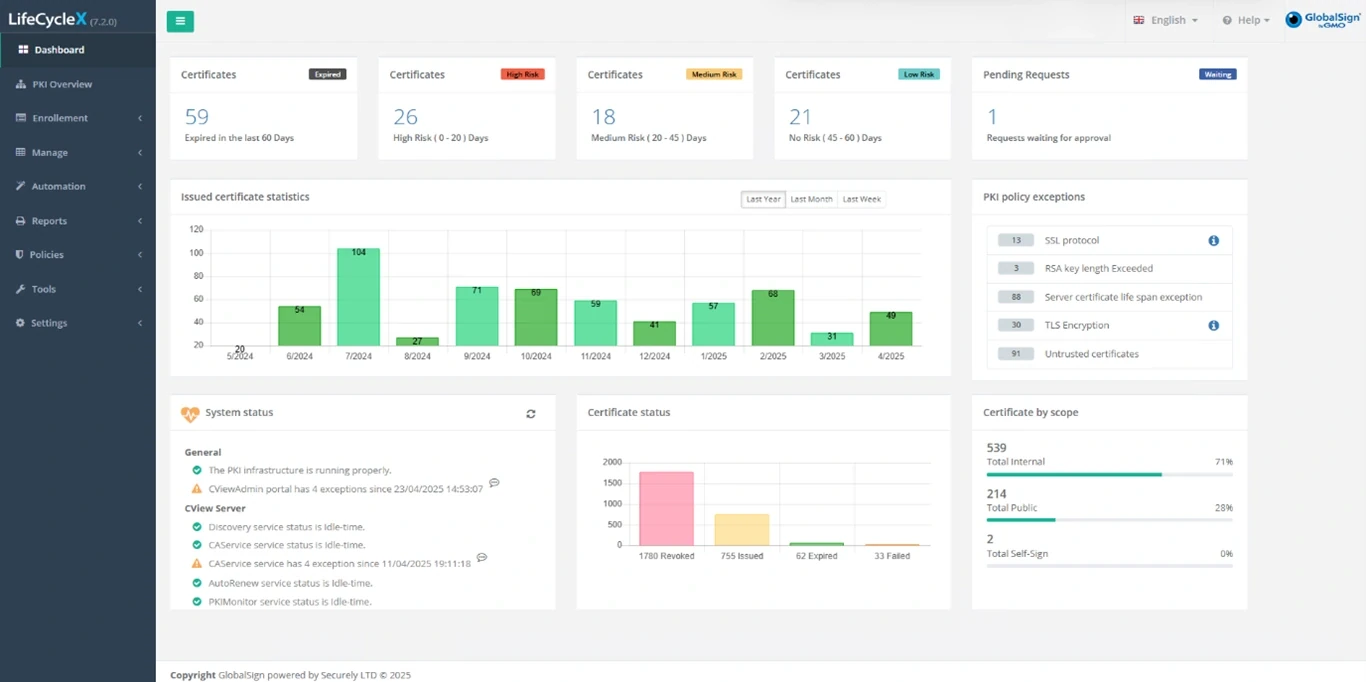
LifeCycleX by GMO provides on-premises deployment, cross-CA inventory, renewal alerts and audit records.
Suitable environments Multiple websites or branches · Active Directory · Hybrid cloud · Large certificate and device estates
Managed PKI, ACME, CAM, TLS Connect and LifeCycleX differ in products, deployment, functions and licensing. TLS Connect is positioned for roughly 1–100 SSL/TLS certificates; LifeCycleX is an on-premises solution.
Deploy email signatures and encryption, or verified brand logos in BIMI-supporting inboxes, according to your needs.
Verify email sender identity and integrity
Encrypt email content with S/MIME
Deploy branded email logos where required
Suitable scenariosBusiness email and sensitive communications
Key capabilities and scope +
S/MIME signatures let recipients verify sender identity and message integrity.
S/MIME encryption protects message content using recipient certificates and private keys.
Plan large deployments through Managed PKI, Active Directory or MDM integration.
VMC and CMC support verification of brand logos meeting BIMI requirements.
Suitable environments Business email · Sensitive communications · Staff and mobile devices · Branded email identity
S/MIME and BIMI Mark Certificates serve different purposes. VMC requires qualifying trademarks; CMC requires evidence of logo-use history. Mark Certificates require SPF, DKIM, DMARC and BIMI readiness; display depends on the receiving platform.
Add verifiable identity and integrity information to electronic documents, integrating signatures and timestamps with existing workflows.
Add verifiable digital signatures to documents
Connect existing document workflows through APIs
Arrange electronic seals and timestamps by plan
Suitable scenariosContracts, approvals and high-volume document signing
Key capabilities and scope +
Digital signatures and electronic seals represent individuals and organisations respectively.
Digital Signing Service (DSS) provides cloud signing through REST APIs.
AATL signing offers USB, HSM or cloud deployment options.
Trusted timestamps support RFC 3161 and long-term signature validation workflows.
Qualified Signatures and Seals are also available, selected by use and identity-verification requirements.
Suitable environments PDF and business documents · Contracts and approvals · Document management systems · High-volume document signing
DSS is a signing component requiring workflow integration. AATL, Advanced and Qualified signatures differ in identity, deployment and legal requirements. Check applicable procedures for Hong Kong or cross-border documents against the transaction and regulatory context.
Help users and deployment systems verify software publishers and file integrity as part of secure development and delivery.
Verify software publisher identity
Check released files for modification
Use tokens or HSMs according to the solution
Suitable scenariosBusiness software and secure development
Key capabilities and scope +
OV and EV Code Signing offer different publisher-verification levels.
Sign software, scripts and executable files.
Protect private keys using compliant tokens or HSMs according to the solution.
Use official integration methods for Azure Key Vault, AWS CloudHSM and CI/CD.
Combine signing with timestamps to support validation after certificate expiry.
Suitable environments Enterprise software · Windows builds and drivers · Java JAR · DevOps and software supply chains
Confirm signing platforms, private-key storage, HSM compatibility and publisher validation. HSM hardware may be separate. New and renewed certificate lifetimes follow current rules; signing does not replace code-security testing.
Identify employees, computers and mobile devices with certificates for business system and network access controls.
Identify employees and devices with certificates
Support VPN and Wi-Fi access
Coordinate issuance, renewal and revocation centrally
Suitable scenariosCorporate networks, mobile devices and authentication
Key capabilities and scope +
Certificate-based authentication for VPNs, gateways, Wi-Fi and business applications.
Machine, server, mobile-device and user identities.
Smart Card or USB-token login where supported.
Coordinate issuance, auto-enrolment and revocation with Managed PKI and Active Directory.
Suitable environments Business Wi-Fi and VPN · Windows and Active Directory · Mobile devices · Server and machine identities
Confirm certificate support in VPN, Wi-Fi, MDM and identity platforms, then configure required multi-factor authentication for endpoints and login workflows.
Manage trust between devices and cloud services with PKI, from enrolment and updates to retirement.
Establish trust between devices and services
Manage device certificates throughout their lifecycle
Integrate enrolment and revocation through APIs
Suitable scenariosIoT, industrial equipment and cloud connections
Key capabilities and scope +
IoT Identity Platform manages device identity, encryption and authentication.
IoT CA Direct and IoT Edge Enroll provide different enrolment and integration approaches.
Certificate issuance, renewal, revocation and device lifecycle records.
Integration and status methods including REST APIs, EST and CRL/OCSP.
Suitable environments IoT and industrial equipment · Device manufacturing and enrolment · Cloud-connected devices · Long-lived device identities
Confirm device capabilities, trust roots, enrolment protocols, private-key protection and cloud integration. Certificates form one part of device security alongside firmware and network protection.
Plan separate certificate hierarchies and trust boundaries for internal systems, device ecosystems and specific applications.
Plan a dedicated enterprise certificate hierarchy
Distinguish public and private trust purposes
Configure certificate policies for system requirements
Suitable scenariosInternal systems and specific device ecosystems
Key capabilities and scope +
Choose dedicated public intermediate CAs or private hierarchies as needed.
GlobalSign can host dedicated root or intermediate CAs.
Configure certificate policies, Extended Key Usage and revocation information by use.
IntranetSSL offers internal TLS certificates from a non-publicly trusted CA.
Suitable environments Internal servers and applications · Large enterprise identity systems · Device or supply-chain ecosystems · Custom trust boundaries
Public and private trust differ. Deploy private trust roots to managed endpoints. A CA used for TLS inspection is not a public website certificate; assess architecture and privacy requirements.