










Hong Kong business · Product selection and integration

Huorong Enterprise SecurityProducts and features

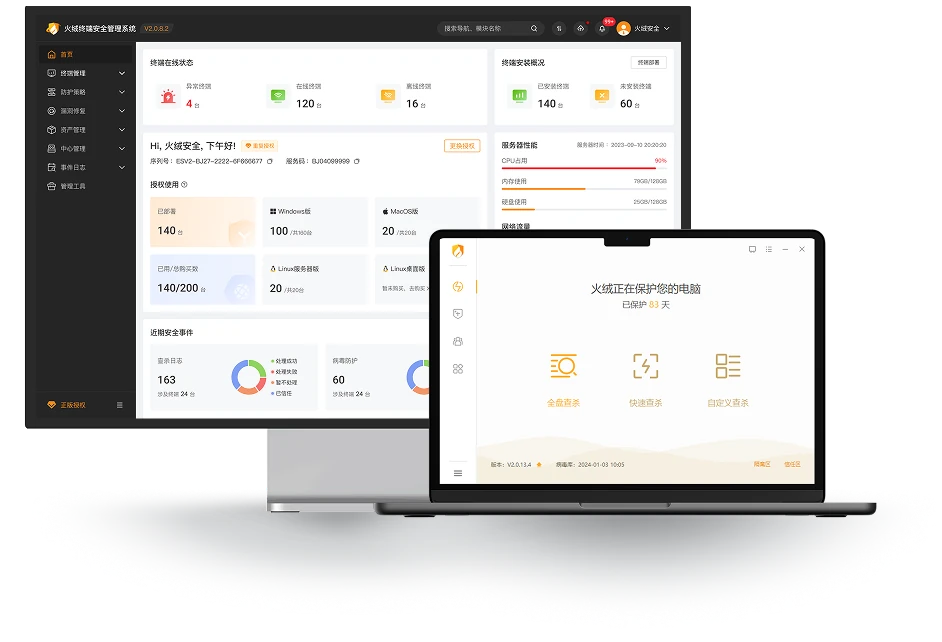
Huorong Endpoint Security Management System V2.0 centralises threat protection, patching, assets and usage policies for business computers.

Manufacturer information reviewed: 2026-10-13

Enterprise product supply and deployment

Official Huorong Endpoint Security Management V2.0 interface showing central management and endpoint protection
Official Huorong Enterprise V2.0 interface exampleVendor image source
4Product and feature categories
4Manufacturer resources
Manufacturer documents and technical information

PRODUCTS & CAPABILITIES

Product capabilities and environments

Four capability groups describe the same enterprise edition. Confirm Windows, Linux, macOS and control-centre support separately.

Endpoint threat protection

Check risks in file and program execution and protect remote logins to reduce endpoint exposure.

  • Inspect file access and execution in real time
  • Detect brute-force sign-in attempts by policy
  • Define allowed remote sign-in scope

Suitable scenariosOffice computers and Windows servers

Key capabilities and scope
  • Real-time checks when files are opened, created or executed
  • Brute-force detection and blocking
  • Remote-login allowlists and protection settings

Suitable environments
Office computers · Windows servers

Administrators must enable remote-login protection. Protocol and OS support depend on endpoint versions. Ransomware protection still requires backups and other controls.

Enquire about product solutions

Central policies and security analysis

Manage computer groups, protection policies and security information through one control centre.

  • Distribute policies by endpoint group
  • View threats, logs and risk analysis
  • Integrate internal security management through APIs

Suitable scenariosMultiple departments, branches and endpoints

Key capabilities and scope
  • Deploy protection policies by group
  • Visualise threats and risks
  • Protection logs and security analysis reports
  • Integrate endpoint information queries and security tasks through APIs

Suitable environments
Endpoints across departments · Branch offices · IT management console

APIs require keys, signatures and permissions. Confirm cross-platform features and control-centre capacity against official deployment requirements.

Enquire about product solutions

Vulnerability, asset and device management

Centralise computer assets, patches and peripheral policies, identifying unmanaged devices.

  • Coordinate vulnerability and patch remediation
  • Inventory hardware/software and find unmanaged devices
  • Restrict peripherals according to business policies

Suitable scenariosCompany computers, assets and peripheral controls

Key capabilities and scope
  • Central vulnerability remediation and patching
  • Software, hardware and system asset inventories
  • Discover endpoints without installed protection
  • Control USB, portable-device and other peripheral use

Suitable environments
Business computers · Software and hardware assets · External storage

Test business impact before applying patches or peripheral policies. Supported functions differ across Linux, macOS and Windows.

Enquire about product solutions

Multi-platform deployment and hardening

Plan installation, version updates and settings around control-centre and endpoint environments.

  • Check deployment requirements by operating system
  • Choose a Windows or Linux management centre
  • Password-protect settings and uninstallation

Suitable scenariosOn-premises and multi-platform endpoints

Key capabilities and scope
  • Windows or Linux control centres
  • Windows, Linux server/desktop and macOS endpoints
  • Virtual-machine deployment checks
  • Password protection for endpoint settings, exit and removal

Suitable environments
On-premises IT environments · Windows / Linux / macOS devices

Check the official operating-system, CPU architecture and version lists. Installation on an old system does not mean its vendor still supplies security support.

Enquire about product solutions

VENDOR RESOURCES · AL-TOUCH SELECTION NOTES

Technical resources and deployment essentials

Review features, deployment requirements and selection notes, then consult complete vendor documentation as needed.

Manuals and documentation

Enterprise V2.0 manuals and hardening documents

Prepare deployment and administration through product familiarisation, installation, everyday use and security hardening.

  • Consult product and installation manuals separately
  • Build daily management around the user guide
  • Check settings against troubleshooting and hardening guidance

Public documentation index · Downloads from the vendor

Read vendor resource
Manufacturer guide

Control-centre and endpoint deployment environments

Check system, processor, storage and virtualisation requirements separately for the management centre and enrolled computers.

  • Choose a Windows or Linux centre for the environment
  • Check Windows, Linux and macOS endpoints individually
  • Prepare hardware capacity and virtual-machine requirements

Public technical guide · May 2026

Read vendor resource
Manufacturer guide

Brute-force protection configuration and troubleshooting

Configure remote sign-in protection, review blocked attempts and legitimate exceptions, and follow up abnormal sources.

  • Distribute policies to endpoint groups from the centre
  • Define exceptions by trusted source and protocol
  • Review blocked attempts and investigate internal/external sources

Public technical guide · May 2026

Read vendor resource
More vendor resources 4 items
Technical documentationEnterprise V2.0 manuals and hardening documentsManufacturer downloads for product introductions, deployment manuals, user guides and hardening advice.Manufacturer guideControl-centre and endpoint deployment environmentsManufacturer deployment guidance dated 8 May 2026.Manufacturer guideBrute-force protection configurationManufacturer protection and configuration guide dated 29 May 2026.Manufacturer guideEnterprise API guideManufacturer authentication, key and integration guide dated 5 June 2026.

Need to assess compatibility with existing systems?Discuss compatibility, deployment and licensing with the team.

Enquire about products and deployment

From product selection to deployment and maintenance

Describe your systems, scale and improvement needs to plan configurations, licences and deployment with the team.

Contact our Hong Kong team Local services and deployment →Browse other brands →