
Distinguish working remotely from providing technical support
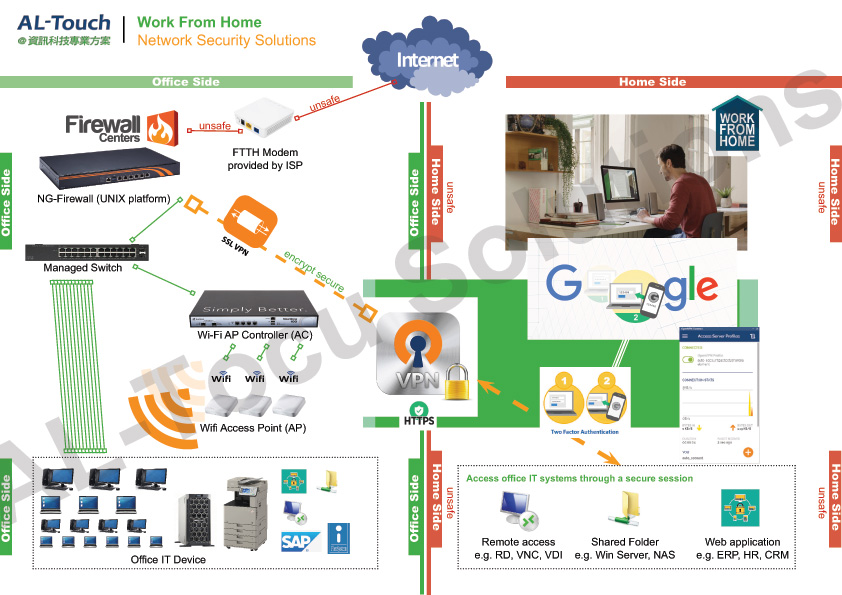
Staff access to business systems, links between branches and vendor operation of computers are different requirements. We select suitable connection methods around the work involved, including remote working, Hong Kong–mainland connectivity and ToDesk Enterprise.
- Staff accessing files, applications, meetings and business phones away from the office.
- Connections between offices or branches and internal systems.
- Authorised access by IT staff or vendors to specified equipment.
Manage permissions and activity records alongside connectivity
VPNs, network separation and remote tools must fit company accounts, equipment and policies. Check ToDesk Enterprise controls and licensing for the chosen edition. A standard licence does not automatically include private deployment or every security feature.
- Specify authorised people, devices and business systems.
- Configure multi-factor authentication where supported and limit administrator and file-operation permissions.
- Approve vendor access first and remove it after work is completed or staff leave.
- Discuss connection records, file transfers and data-processing requirements.

Test connections and access suspension
Before deployment, test normal work, unavailable networks and insufficient permissions, as well as the ability to end or revoke access. Connections across borders or branches need to account for applications, latency and circuits. Define telecom services, internal configuration and support separately, with a named contact for faults.
Prepare locations, equipment and usage requirements
Do not send remote-access passwords or verification codes in an initial enquiry. Authorised staff should arrange support access separately.
- Office locations, circuits, user numbers and supported devices.
- Applications, files and equipment to access, including concurrent connections.
- Existing VPNs, remote tools and management methods.
- Who may approve or end access, support requirements and data-location needs.
Service scope, hours and fees are subject to the agreed proposal.
Information and references
When is this service suitable?
Common needs
- Branch or overseas equipment needs remote assistance.
- Staff need company-system access outside the office.
- You want clear remote-tool accounts, approvals and departure-related revocation.
Which service do I need?
- Work-from-home solutions
Organise systems and tools for remote work.
- ToDesk Enterprise
Confirm enterprise support and management features by plan.
- Business computer maintenance
Discuss everyday support and device management.
Prepare for an enquiry
- Office locations, support staff and device counts.
- Required systems and daily work scenarios.
- Current VPNs, remote tools and permission responsibilities.
For an initial enquiry, describe the issue and equipment only. Do not submit passwords or verification codes. The team will arrange a secure channel for sensitive documents and incident records.
EnquireRemote work and branch IT supportCybersecurity and AI useExplore security planning, responsibilities and acceptance considerations
Cybersecurity · Safe AI use
Remote work and business support: security planning priorities
「Remote working and branch IT support」 includes the following security priorities; measures, tests and deliverables are specified in the proposal.
- Support authorisationConfirm supported devices, users and administrators, then discuss connection approvals, access windows and termination.
- Operations and dataCheck permissions, file transfers and logs for the tool and plan, keeping personal accounts and shared passwords out of business maintenance.
- Maintenance and incidentsClarify updates, unusual-connection alerts and incident contacts, including access termination and record preservation.
AI considerationsFor AI or scripted remote work, restrict accessible devices and tools. Confirm approval procedures for installation, permission changes and sensitive-data transfer.
Planning and acceptance recordsRemote account and device inventory, permissions and log settings, deactivation and incident procedures.
You may also want to know
With only one branch, can we keep the current broadband and equipment?
Provide circuit, equipment and application details first. Test current connectivity and management, then compare any changes needed to VPNs, network configuration or remote-support tools.
Do ToDesk Enterprise and a VPN do the same job?
They serve different purposes. Remote tools generally operate supported devices, while a VPN establishes a controlled network connection. Whether you need one or both depends on the systems and support scenario.
How do we avoid leaving vendor permissions active after support is finished?
Define the approver, permitted period and access-removal steps. Check accounts, connection records and suspension methods according to the tool's capabilities. Include staff departures and vendor changes in the same process.