










Hong Kong business · Product selection and integration

ToDesk EnterpriseProducts and features

Manage remote work, technical support and maintenance through business accounts and device permissions, retaining connection and activity records.

Manufacturer information reviewed: 2026-10-13

Enterprise edition distributor

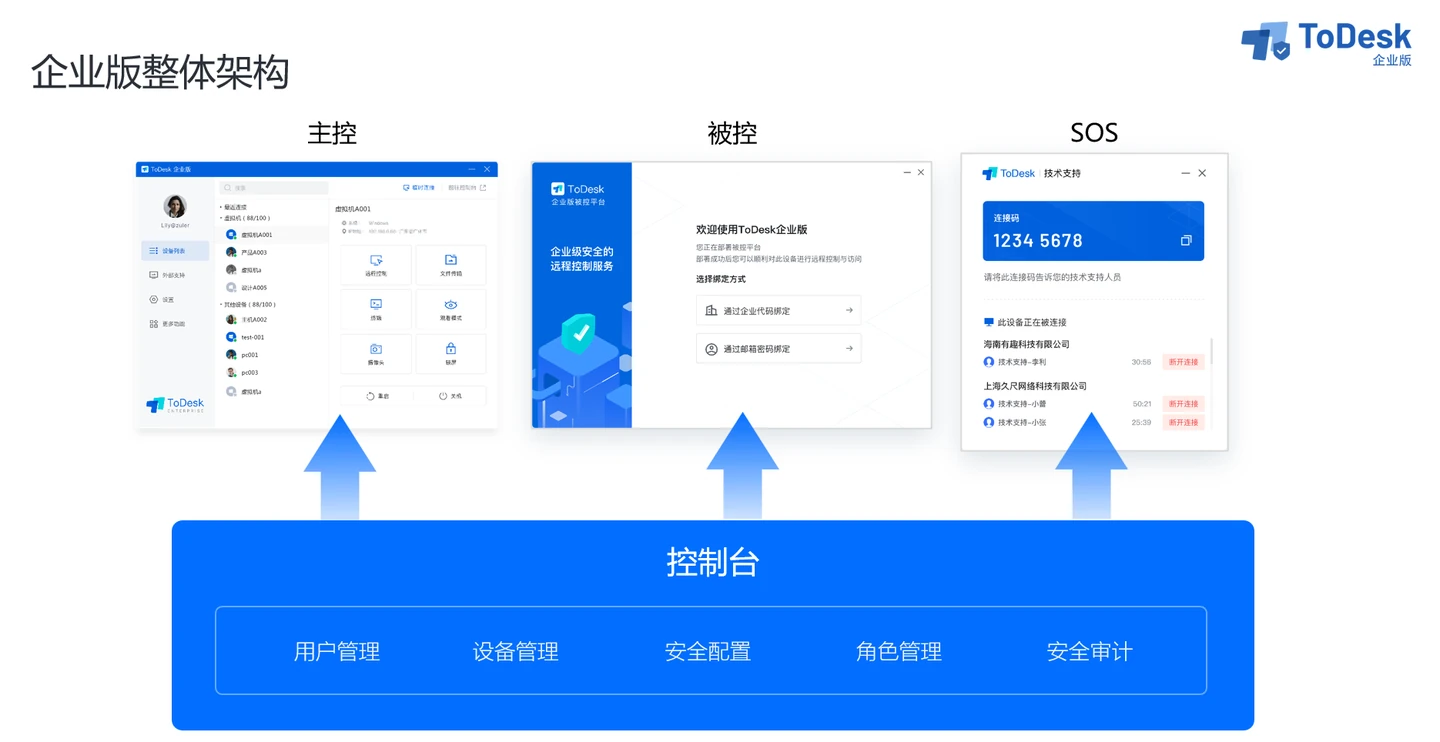
Official ToDesk Enterprise architecture showing controlling endpoints, controlled endpoints, SOS and console responsibilities
Official ToDesk Enterprise architecture exampleVendor image source
5Product and feature categories
5Manufacturer resources
Manufacturer documents and technical information

PRODUCTS & CAPABILITIES

Product capabilities and environments

Five ToDesk Enterprise use and capability groups, selected by operating system, deployment and plan. They are not five separately licensed products.

Business remote work and design

Connect to office computers or workstations to continue everyday office and design tasks.

  • Access office computers and workstations remotely
  • Configure multiple or virtual displays as supported
  • Support peripherals for design workflows

Suitable scenariosRemote staff and design workstations

Key capabilities and scope
  • Remote connections through business accounts
  • Multiple and virtual-display scenarios
  • Design workstation and peripheral collaboration

Suitable environments
Office computers · Design workstations · Remote employees

Picture quality, multiple displays and peripherals depend on controlling and remote systems, hardware and client versions.

Enquire about product solutions

Technical support and SOS

Arrange suitable remote assistance for permanent devices or temporary support requests.

  • Separate permanent devices from temporary support
  • Obtain user consent before SOS connections
  • Elevate privileges after authorisation and verification

Suitable scenariosIT support and temporary troubleshooting

Key capabilities and scope
  • Authorise permanent devices through device groups
  • Temporary SOS connections require the supported party's consent
  • Authorised staff can temporarily elevate privileges through the agreed process

Suitable environments
IT support · External technical assistance · Temporary troubleshooting

SOS elevation requires a supported version, local or domain administrator verification and access authorisation.

Enquire about product solutions

Accounts, devices and access permissions

Administrators assign accounts, roles and accessible devices for staff and external support providers.

  • Organise staff accounts and device groups
  • Assign remote-operation permissions by role
  • Integrate company accounts as configured

Suitable scenariosBranch devices and internal/external support accounts

Key capabilities and scope
  • User and device groups
  • Roles and remote-operation permissions
  • Enterprise deployment codes or account binding
  • AD and Feishu account integration scenarios

Suitable environments
Company equipment · Branch offices · Internal and external support accounts

Configure third-party SSO and user imports for the actual environment. Enterprise, personal and team editions are different product systems.

Enquire about product solutions

Activity auditing and data controls

Manage connections, screen recordings and data transfers under company policy.

  • Review connection and operation logs
  • Use recording and account watermarks by plan
  • Restrict file and clipboard transfer directions

Suitable scenariosRemote-maintenance reviews and sensitive workflows

Key capabilities and scope
  • Connection and activity logs
  • Screen recording and account watermarks
  • Directional limits on file and clipboard transfers
  • Additional console-login verification and connection intervention

Suitable environments
Remote maintenance records · Sensitive workflows · Internal IT reviews

Confirm recording, storage location, retention and decryption rights by plan and deployment, with employee and customer data-processing arrangements established first.

Enquire about product solutions

Cross-platform device maintenance

Plan remote maintenance around operating systems, device groups and support methods.

  • Configure controlling and controlled endpoints by platform
  • Separate permanent installation from installation-free SOS
  • Group unattended devices for maintenance

Suitable scenariosComputer, server and fixed-device maintenance

Key capabilities and scope
  • Windows, macOS, Linux and mobile clients
  • Full remote agents and installation-free SOS serve different roles
  • Permanent-device maintenance and group management

Suitable environments
Computers and servers · Unattended equipment · Mobile support

Remote control, privacy screens and privilege elevation vary by platform. Check current Mac and Linux remote-agent limitations specifically.

Enquire about product solutions

VENDOR RESOURCES · AL-TOUCH SELECTION NOTES

Technical resources and deployment essentials

Review features, deployment requirements and selection notes, then consult complete vendor documentation as needed.

Technical documentation

Enterprise architecture and usage scenarios

Separate controlling, controlled and temporary-support roles while managing accounts, devices and logs centrally.

  • Match controlling, controlled and SOS roles to support scenarios
  • Arrange remote work by personnel and device groups
  • Plan reviews using logs, recordings and watermarks

Public product documentation · Updated October 2026

Read vendor resource
Manufacturer guide

Device enrolment: deployment codes and accounts

Compare code-based and account-based enrolment, grouping devices for central management or individual office use.

  • Deployment codes enrol devices into designated groups
  • Administrators assign access and security settings centrally
  • Account-based enrolment has separate default access relationships

Public deployment guide · Updated May 2026

Read vendor resource
Technical documentation

Remote-operation security settings

Manage clipboard transfers, connection logs and authentication alongside remote support and business data controls.

  • Restrict clipboard direction by role
  • Filter active connections and allow administrator intervention
  • Configure console second-factor verification by account policy

Public release notes · Windows v2.0.0

Read vendor resource
More vendor resources 4 items
Manufacturer guideEnterprise first-connection guideConfiguration of controlling clients, remote clients and business accounts.Manufacturer guideTechnical-support configuration guideRoles, device groups and support permissions.Manufacturer guideDevice binding and enterprise deployment codesDifferences between deployment codes and account binding.Technical documentationSecurity features and release notesSpecific v2.0.0 update document. Confirm current features against clients and plans.

Need to assess compatibility with existing systems?Discuss compatibility, deployment and licensing with the team.

Enquire about products and deployment

From product selection to deployment and maintenance

Describe your systems, scale and improvement needs to plan configurations, licences and deployment with the team.

Contact our Hong Kong team Local services and deployment →Browse other brands →